准备
内核版本: 5.0
cgroup 全称Control Groups,顾名思义就是把进程放到一个组里面统一加以控制,cgroup 可以限制进程的各种资源,包括用来控制一组进程的内存使用量,cgroup 把各种资源控制器成为子系统,内存控制即为内存子系统.
使用方法
cgroup 目前现存两个版本,我们仅讨论 cgroup v1 的使用方法.
Centos安装cgroup:
sudo yum -y install libcgroup-tools在目录`/sys/fs/cgroup"下挂在tmpfs文件系统
mount -t tmpfs none /sys/fs/cgroup在目录
/sys/fs/cgroup下创建目录memorymkdir /sys/fs/cgroup/memory在目录
sys/fs/cgroup/memory下挂载cgroup文件系统, 把内存资源控制器关联到控制组mount -t cgroup -o memory none /sys/fs/cgroup/memory创建新的控制组
mkdir /sys/fs/cgroup/memory/test_memory设置控制组的内存使用限制
2G:sudo echo 2147483648 > /sys/fs/cgroup/memory/test_memory/memory.limit_in_bytes将线程组加入控制组:
sudo echo <pid> > /sys/fs/cgroup/memory/test_memory/cgroup.procs或者启动进程附带控制组:
cgexec -g memory:test_memory ./a.out
cgroup内存子系统
内存资源控制器 mem_cgroup
cgroup 的内存资源控制器限制每一个控制组的 Page Cache 和 RSS 物理内存.
/*
 * The memory controller data structure. The memory controller controls both
 * page cache and RSS per cgroup. We would eventually like to provide
 * statistics based on the statistics developed by Rik Van Riel for clock-pro,
 * to help the administrator determine what knobs to tune.
 */
struct mem_cgroup {
	struct cgroup_subsys_state css;

	/* Private memcg ID. Used to ID objects that outlive the cgroup */
	struct mem_cgroup_id id;

	/* Accounted resources */
	struct page_counter memory;  /* 内存计数器 */
	struct page_counter swap;    /* 交换区计数器 */

	/* Legacy consumer-oriented counters */
	struct page_counter memsw;
	struct page_counter kmem;     /* 内核内存限制计数器 */
	struct page_counter tcpmem;   /* TCP的socket缓冲区计数器 */

	/* Upper bound of normal memory consumption range */
	unsigned long high;   /* 限制使用的内存上限 */

	/* Range enforcement for interrupt charges */
	struct work_struct high_work;

	unsigned long soft_limit;

	/* vmpressure notifications */
	struct vmpressure vmpressure;

	/*
	 * Should the accounting and control be hierarchical, per subtree?
	 */
	bool use_hierarchy;			/* 是否启用分层计数 */

	/*
	 * Should the OOM killer kill all belonging tasks, had it kill one?
	 */
	bool oom_group;

	/* protected by memcg_oom_lock */
	bool		oom_lock;
	int		under_oom;

	int	swappiness;
	/* OOM-Killer disable */
	int		oom_kill_disable;    /* 是否打开OOM的killer, 即kill超出限制的内存容量的进程 */

	/* ... */
};
结构体 page_counter 是页计数器,单位为Page:
struct page_counter {
        atomic_long_t usage;   /* 已使用的Page数量 */
        unsigned long min;
        unsigned long low;
        unsigned long max;
        struct page_counter *parent;

        /* effective memory.min and memory.min usage tracking */
        unsigned long emin;
        atomic_long_t min_usage;
        atomic_long_t children_min_usage;

        /* effective memory.low and memory.low usage tracking */
        unsigned long elow;
        atomic_long_t low_usage;
        atomic_long_t children_low_usage;

        /* legacy */
        unsigned long watermark;
        unsigned long failcnt;
};
理解cgroup内存记账
当为内存控制组中的进程分配物理内存时,会记录内存使用量, 内存记账简单的理解为记录控制组的内存使用量, 以下是记录的时间点:
- 第一次访问匿名页时分配物理页.
- 访问文件时分配物理页(Page Cache) .
- 执行COW(写时复制)时,分配物理页.
- 从交换区换入页.
我们仅分析4类中较为常见的访问文件分配物理页的内存记账处理过程:
我们以ext4文件系统为例, 当需要读取文件时,某个Page不在内存中,需要把该Page读取至内存中,即调用 address_space 的操作函数 ext4_readpage:
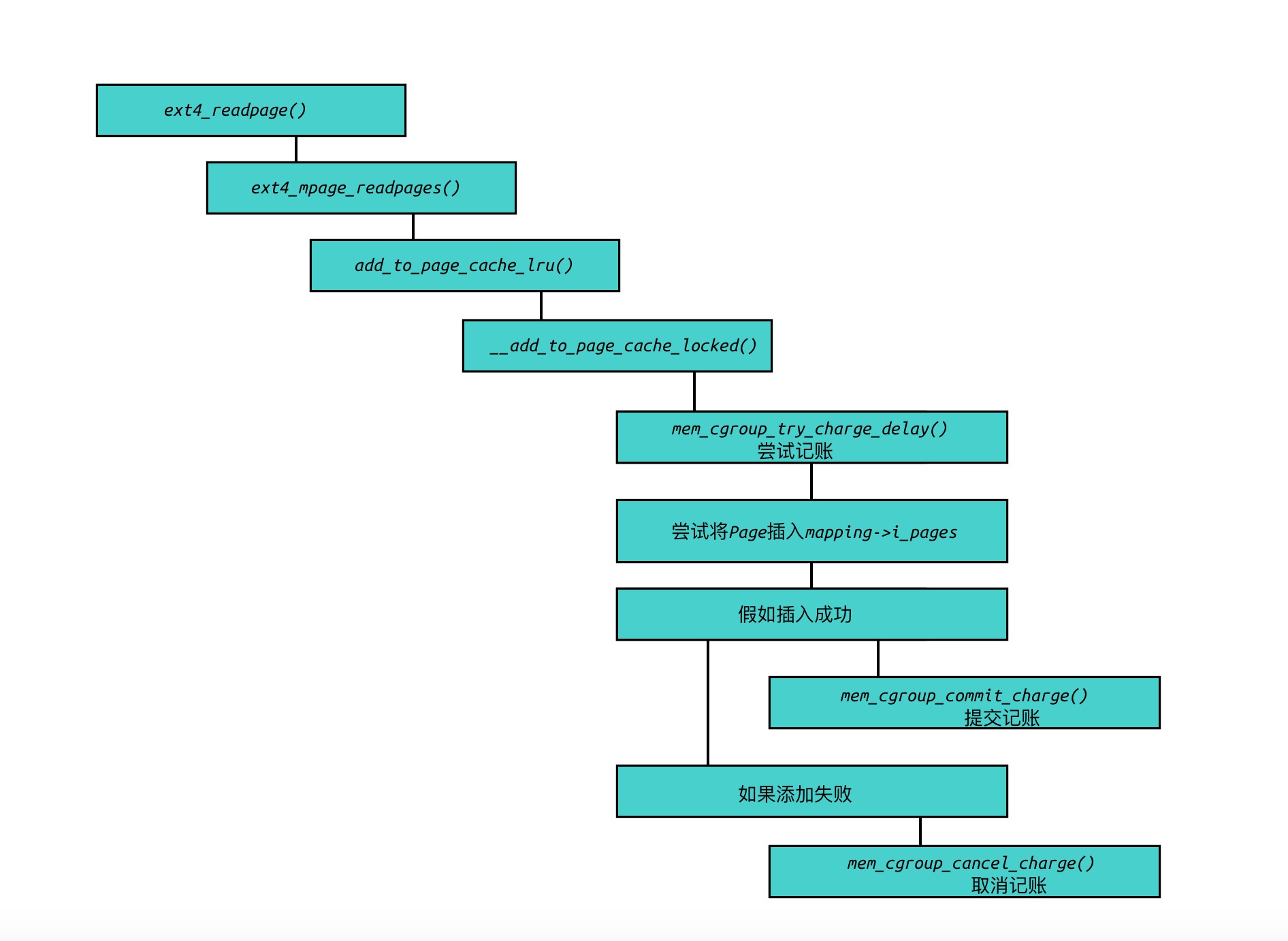
内存计数步骤:
mem_cgroup_try_charge()用来表示尝试记账, 把内存控制组的内存计数加上指定的数量.如果成功,调用
mem_cgroup_commit_charge()以提交计数,否则调用mem_cgroup_cancel_charge()放弃计数.
OOM killer
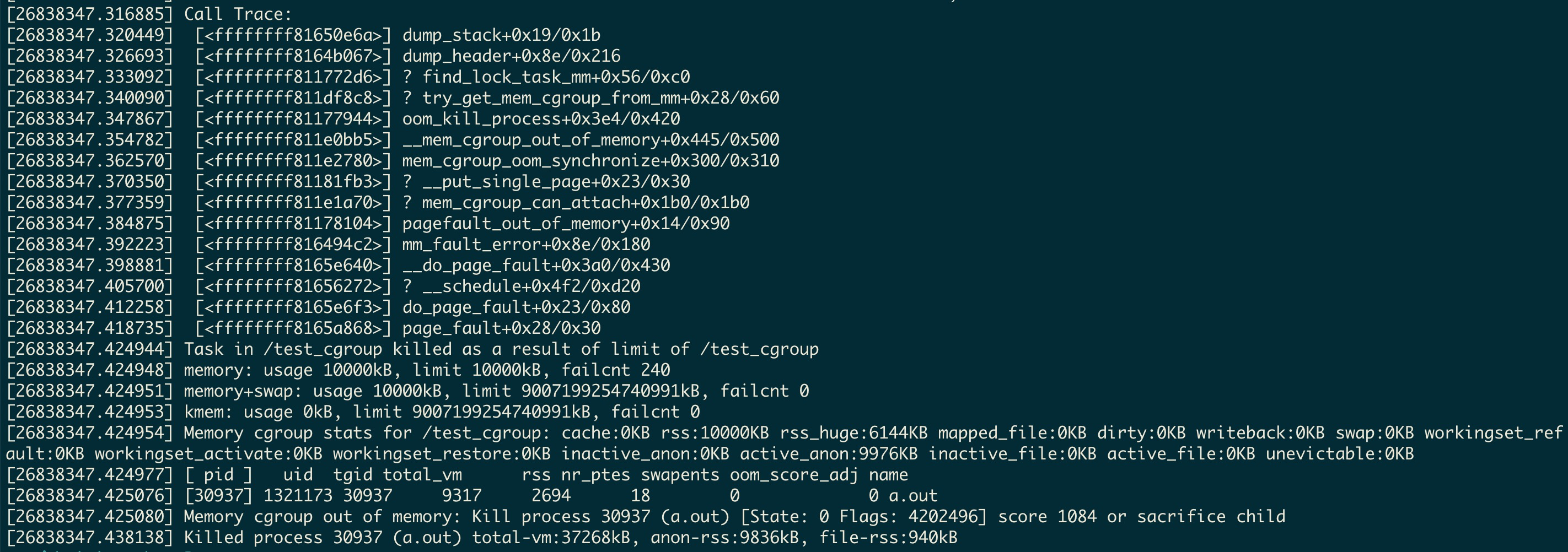
cgroup的内存控制器是默认开启OOM killer,当进程消耗的内存超过了cgroup的限制,就会调用OOM killer,向指定的进程发送杀死信号 SIGKILL. 假如触发了OOM,关于crgroup内存控制kill的信息,可以通过 dmesg 进行查看.
dmesg示例
新建了一个名为 test_cgroup 的控制组, 使用进程 a.out 申请超过cgroup限制大小的内存:
Q&A
- 使用cgroup遇到
cgroup change of group failed问题:
注意
/sys/fs/cgroup/test_memory即控制组的目录权限, 是否与执行进程的文件权限保持一致.
- 即使进程以及完全退出,cgroup的内存控制组目录仍然无法清理?
因为cgroup会限制进程使用Page Cache,而Page Cache的清理不会随着进程的退出而完成,所以当我们使用cgroup限制的进程有文件读写操作从而使用了Page Cache, 会导致cgroup内存控制组目录无法清理,所以正确的做法是清空Page Cache:
echo 3 > /proc/sys/vm/drop_caches或者echo 3 > /cgroup/memory/test_memory/memory.drop_caches
参考
《Linux内核深度解析》